

Standing Desk Benefits for Health Explained
Table of Contents
- Standing Desk Benefits for Health Explained
- How Long to Stand at Your Desk Each Day
- Standing Desk Ergonomics Guide: Posture and Setup
- Is Standing Better Than Sitting for Back Pain
- Real Health Gains: What the Evidence Shows
- Common Mistakes When Switching to a Standing Desk
- Supporting Your Standing Desk Setup With Wellness Tools
- Frequently Asked Questions
Last Updated: 2 October 2026
Standing Desk Benefits for Health Explained
Standing desk benefits have become central to how people design their work environments, particularly for those spending long hours at a desk. The shift from sitting all day to incorporating standing time addresses a genuine concern: prolonged sitting creates measurable strain on the spine, neck, and lower back. Professionals making this transition often report improved comfort and reduced pain within their first month, though the real gains come from understanding how to use a standing desk correctly.
The appeal is straightforward. Your body wasn't designed to sit motionless for eight hours. When you stand, your muscles engage differently. Your core stabilises. Your circulation improves. But here's what most guides get wrong: simply standing at a desk all day replaces one problem with another.
Standing desk benefits extend beyond comfort. Many professionals find that switching positions throughout the day sharpens focus and reduces the afternoon energy crash. Your posture naturally improves when you're standing, which changes how you breathe and how oxygen reaches your brain. Over time, this can translate into better concentration during demanding work.
How Long to Stand at Your Desk Each Day
The ideal balance isn't standing all day, it's alternating between sitting and standing in manageable intervals.
Your body needs time to adjust. If you switch to standing full-time immediately, your feet, legs, and lower back will protest within days.
Start with a 20-minute standing block, then sit for 40 minutes. After two weeks, shift to 30 minutes standing and 30 minutes sitting.
The standing desk benefits you'll notice depend partly on how you structure your day. Alternate standing with sitting during low-focus tasks, emails, administrative work, or quick calls.
Standing Desk Ergonomics Guide: Posture and Setup
Proper standing desk ergonomics determine whether you experience relief or develop new problems. A poorly configured standing desk can create neck strain, wrist pain, and shoulder tension. The setup matters more than the desk itself.
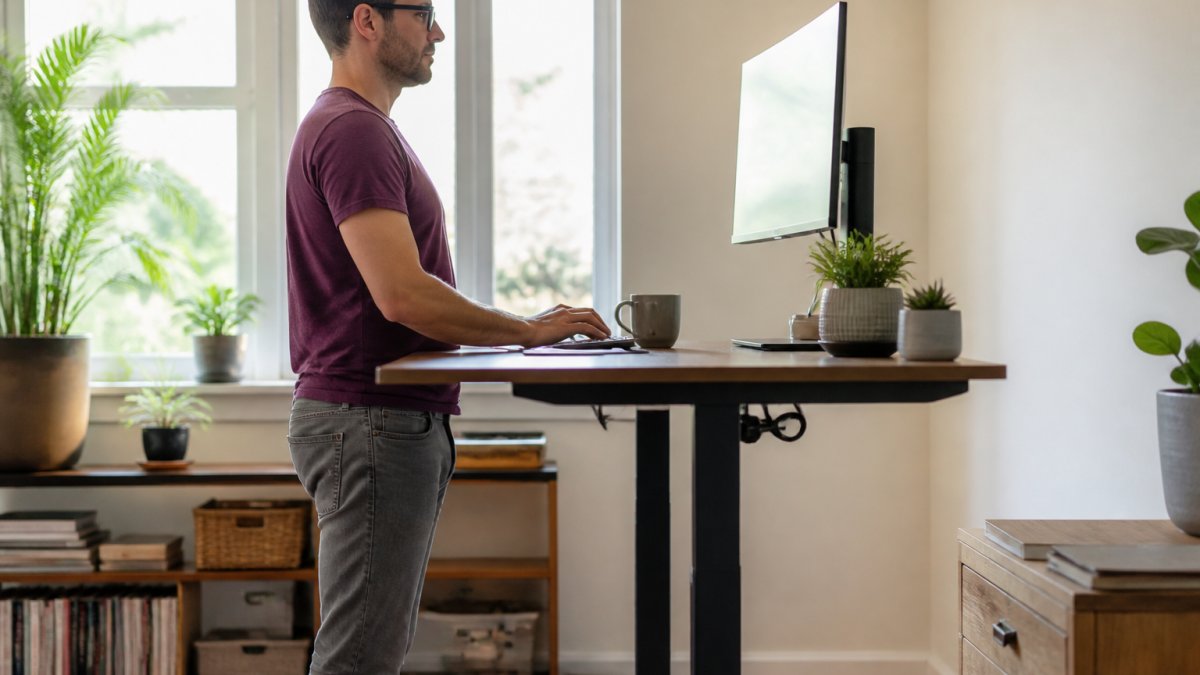
Monitor and Screen Placement
Your monitor height is the single most important ergonomic factor. Position the top of your screen at or slightly below eye level when standing with your head in a neutral position (Working safely with display screen equipment). This prevents the forward head posture that develops when you look down at a screen, which strains your neck and upper back.
The monitor should sit 50-70 centimetres away from your eyes, roughly an arm's length. This distance reduces eye strain and forces you to maintain better posture. If your screen is too close, you'll lean forward. Too far away, and you'll crane your neck backwards. Most standing desk ergonomics problems trace back to monitor placement.
Keyboard and Mouse Height
Your keyboard and mouse should sit at a height where your elbows bend at approximately 90 degrees when your arms hang naturally at your sides (Working safely with display screen equipment). This position keeps your wrists neutral and prevents the repetitive strain that leads to carpal tunnel syndrome or tendinitis.
Many people position their keyboard too high or too low, creating wrist strain without realising it. Your wrists should be straight when typing, not bent upward or downward. If your standing desk height doesn't allow this, use a keyboard tray that adjusts independently of your desk surface.
Feet and Lower Body Alignment
Your feet should sit flat on the floor or on an anti-fatigue mat, positioned hip-width apart. Your weight should distribute evenly across both feet. Many people shift their weight to one leg when standing, which creates asymmetrical strain on the lower back and hips.
An anti-fatigue mat encourages subtle movement and reduces the strain on your feet and legs during extended standing periods (Lower limb disorders). The slight instability of the mat engages your stabiliser muscles, which actually reduces fatigue compared to standing on a hard floor. This is one of the standing desk benefits people notice immediately, less foot pain by the end of the day.
Is Standing Better Than Sitting for Back Pain
Standing isn't inherently better than sitting for back pain. Both positions create problems when held statically for too long. The real answer is movement and variation.
If you experience back pain from sitting, standing alone won't fix it. However, incorporating standing time into your day often reduces pain because it forces postural changes and engages your core differently.
If you have existing back pain, consider supporting your standing desk setup with targeted tools. The SpineFlow™ Fix Daily Back Pain From Sitting For Long Hours provides comfort.
Real Health Gains: What the Evidence Shows
The standing desk benefits that matter are the ones you can sustain. Improved circulation, better posture, and reduced sedentary time all contribute to better long-term health outcomes.
Neck and shoulder tension often improves when people switch from fixed sitting positions to varied postures. This happens because standing naturally encourages better head and shoulder alignment. However, this benefit evaporates if your monitor is positioned incorrectly or if you slouch whilst standing.
SpineFlow™ Fix Daily Back Pain From Sitting For Long Hours →
The standing desk benefits extend to your daily routine. People who alternate positions tend to move more throughout the day. They stretch more often. They adjust their position more frequently.
Common Mistakes When Switching to a Standing Desk
The most common mistake is switching to standing too aggressively. People buy a standing desk, set it to standing height on day one, and stand for eight hours.
Another frequent error is neglecting to adjust your setup as you transition. Your monitor height might be correct for sitting but wrong for standing. Your keyboard might need repositioning.
Poor footwear compounds the problem. Standing in unsupportive shoes creates foot pain and throws off your posture.
Many people also fail to move enough whilst standing. Standing still for an hour is almost as problematic as sitting still for an hour.
Supporting Your Standing Desk Setup With Wellness Tools
A standing desk works best as part of a broader approach to workspace wellness.
Neck tension is particularly common among people who spend hours at desks.
Hand and wrist strain can develop from keyboard and mouse use, regardless of whether you're sitting or standing.
For recovery and muscle tension relief, the LumoPress™ Deep Recovery Cupping addresses the muscle tension that builds up from sustained postures, whether standing or sitting. This kind of recovery work extends the standing desk benefits by ensuring your body doesn't accumulate chronic tension.

Sleep quality often improves when you incorporate standing time into your day, but many people still experience lower back discomfort at night.
Standing desk benefits are real, but they require intentional implementation. Start gradually, configure your setup carefully, and alternate between sitting and standing throughout your day.
Frequently Asked Questions
Do standing desks actually improve health?
Standing desks offer measurable benefits when used correctly. They reduce prolonged static pressure on your lower back, improve circulation, and encourage better posture compared to sitting all day. However, standing for eight hours straight is no better than sitting for eight hours, the key is alternating between sitting and standing throughout the day. A standing desk is most effective as part of a mixed approach that includes movement and breaks.
How long should you stand at a desk each day?
Most ergonomics experts recommend alternating between sitting and standing every 30 to 60 minutes. Start with 20 to 30 minutes of standing per hour if you're new to a standing desk, then gradually increase as your body adapts. Aim for a 50/50 split between sitting and standing over your working day. Listen to your body, if your feet or legs feel fatigued, sit down. The goal is movement and variety, not maximum standing time.
Can a standing desk help with lower back pain?
Standing desks can help reduce lower back pain when properly set up and used with correct posture. They reduce the compression forces on your spine that occur during prolonged sitting. However, standing alone won't cure back pain, you need proper monitor height, keyboard position, and regular position changes. Products like the SpineFlow™ Fix Daily Back Pain From Sitting For Long Hours work well alongside a standing desk to address pain from both sitting and standing periods.
What is the correct ergonomic posture at a standing desk?
Keep your monitor at eye level, about 50-70 centimetres away. Your elbows should bend at roughly 90 degrees with your keyboard and mouse at elbow height. Stand with your feet hip-width apart, weight distributed evenly, and avoid locking your knees. Your shoulders should be relaxed, not hunched. Wear supportive shoes and consider an anti-fatigue mat to reduce foot and leg strain during longer standing periods.
Are there downsides to using a standing desk?
Standing for too long without breaks can cause foot pain, leg fatigue, and lower back strain, the opposite of what you're trying to achieve. Some people experience increased pressure on their knees or hips if they stand with poor posture. Standing desks also don't suit everyone; those with certain circulatory conditions or joint issues may find prolonged standing uncomfortable. The solution is alternating positions regularly and using supportive accessories like the OrthoAlign™ Knee Pillow for additional comfort during rest periods.
Do standing desks help burn more calories?
Standing does burn slightly more calories than sitting, typically 8 to 15 additional calories per hour depending on your body weight and activity level. However, this difference is modest and shouldn't be your primary reason for using a standing desk. The real benefit is improved posture, reduced back pain, and better circulation. For meaningful calorie expenditure and fitness gains, combine standing desk use with regular movement breaks and exercise throughout your day.
What accessories work best with a standing desk?
An anti-fatigue mat reduces foot strain and encourages subtle movement whilst standing. A desk converter or monitor arm helps you adjust height easily for switching between sitting and standing. Supportive footwear is essential. Wellness tools like the NeckRelief Pro™ and SpineFlow™ Fix address tension from both sitting and standing work, keeping your neck and back comfortable throughout the day. These accessories make the transition to standing desk work more sustainable.