

How to Reduce Eye Strain at Work: 7 Proven Tips
Table of Contents
- Why Eye Strain Happens at Work
- Recognise Digital Eye Strain Symptoms
- Get Your Computer Screen Distance Right
- Apply the 20-20-20 Rule for Eyes
- Optimise Office Lighting to Reduce Eye Strain
- Adjust Your Workspace Setup and Habits
- When to Seek Professional Help
- Frequently Asked Questions
Last Updated: October 17, 2026
Why Eye Strain Happens at Work
To reduce eye strain at work, it helps to understand that digital eye strain occurs when your eyes work harder than normal. This happens because screens demand more focus than printed text. Your eyes have to track light that's being emitted directly at you, not reflected light from paper. Add poor lighting, bad screen positioning, or long stretches without breaks, and your eyes tire quickly.
The problem gets worse over time. When you stare at a screen, you blink less often. Your tear film breaks down. Your eye muscles tense up. None of this happens gradually; it compounds within hours.
At Inspree, we understand that workspace comfort directly affects your wellbeing. Many people dismiss eye strain as minor discomfort, but it signals that something in your setup needs adjustment. The good news: most causes are fixable.
Recognise Digital Eye Strain Symptoms
Digital eye strain is the discomfort you feel after extended screen time. It's not an eye disease. It's a signal that your visual system is working too hard.
Common symptoms include:
- Dry, scratchy eyes
- Blurred vision
- Headaches behind your eyes
- Neck and shoulder tension
- Difficulty focusing
- Light sensitivity
You might notice these symptoms worsen as the day progresses. By late afternoon, your eyes feel exhausted. This is normal, but it's also preventable.
Some people confuse digital eye strain with other conditions. If symptoms persist after you've adjusted your workspace, see an optician. Persistent pain or vision changes warrant professional assessment.
Get Your Computer Screen Distance Right
The correct distance between your eyes and screen is roughly an arm's length away. This typically means 50-70 centimetres from your face to the monitor. At this distance, your eyes relax into their natural focal length.
Your screen height matters equally. The top of your monitor should be at or slightly below eye level when you're sitting upright (Working safely with display screen equipment). This angle keeps your neck neutral and reduces strain on your eye muscles.
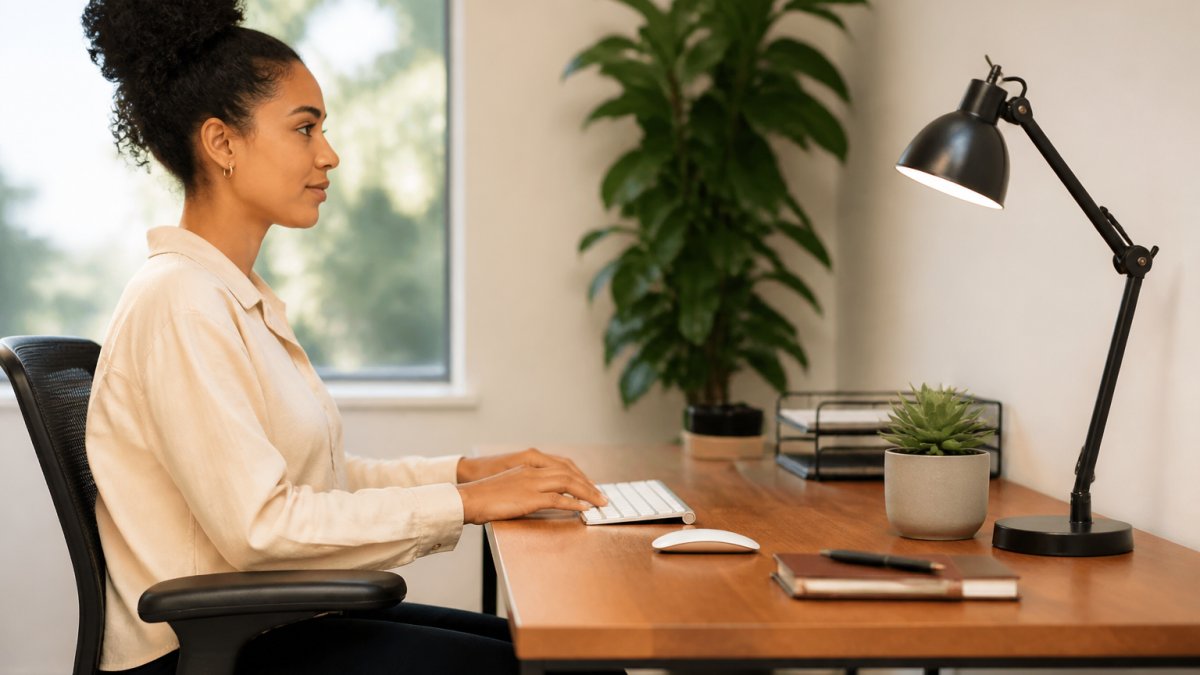
Many people position screens too close or too high. Close screens force your eyes to converge and focus intensely. High screens pull your gaze upward, straining the muscles that control eye movement.
Test your setup now. Sit naturally. Extend one arm forward. Your fingertips should nearly touch the screen. If they don't, adjust the monitor backwards or forwards. Then check that the screen top aligns with your eye level.
Apply the 20-20-20 Rule for Eyes
The 20-20-20 rule for eyes is simple: every 20 minutes, look at something 20 feet away for 20 seconds. This breaks the cycle of constant close-focus work.
Here's why it works. When you focus on a distant object, your eye muscles relax completely. Your tear film stabilises. Your eyes reset. Twenty seconds is long enough to achieve this reset. Twenty minutes is short enough that you'll actually do it.
Set a timer on your phone or use a free app to remind you. When the timer sounds, stop what you're doing. Look out a window. Look across the room. Focus on something at least 20 feet away. Count slowly to 20. Return to work.
This single habit can reduce eye strain at work more than most interventions. It costs nothing. It takes minimal time. Yet many people skip it because they underestimate its impact.
Optimise Office Lighting to Reduce Eye Strain
Lighting is often the hidden culprit behind eye strain. Poor lighting forces your eyes to work harder to process visual information.
Avoid these common mistakes:
Lumo Relief™️ Heated Migraine Mask →
- Harsh overhead lighting that creates glare on your screen
- Positioning your desk facing a bright window
- Relying solely on screen light in a dark room
- Undershooting with dim task lighting
Instead, use layered lighting. Combine ambient light (ceiling fixtures), task lighting (desk lamp), and natural light (window position). Adjust each layer to eliminate glare and shadows.
Your desk lamp should illuminate your work surface without shining directly into your eyes or onto your screen. Position it to the side of your monitor, not behind it. If you work near a window, close blinds during peak sun hours to prevent screen glare.
Many people find that warm-toned lighting (2700K colour temperature) feels more comfortable than cool white light (5000K+). Experiment to find what feels easiest on your eyes.
Adjust Your Workspace Setup and Habits
Your workspace setup influences eye strain more than most people realise. Small changes compound into significant comfort improvements.
Start with these adjustments:
- Monitor height: Top of screen at or slightly below eye level
- Viewing distance: Arm's length away (50-70 centimetres)
- Screen angle: Tilted slightly upward, roughly 20 degrees below horizontal
- Chair height: Feet flat on floor, thighs parallel to ground
- Keyboard position: Elbows at 90 degrees, wrists neutral
Your habits matter as much as your setup. Blink deliberately. Many people reduce blink rate by 60% when focusing on screens. Consciously blink every few seconds. This keeps your tear film healthy.
Take proper breaks. Don't eat lunch at your desk while working. Step away from your screen. Move your body. This gives your eyes and mind genuine rest.
Consider investing in ergonomic equipment. A monitor arm lets you adjust height and distance precisely. A desk lamp designed to reduce glare makes a real difference. At Inspree, we stock products like the Lumo Relief™️ Heated Migraine Mask, which provides targeted relief after long work sessions. At just £18.00, it offers a practical way to ease tension and support your eyes after demanding days.

When to Seek Professional Help
Most eye strain improves within days of adjusting your workspace. If symptoms persist after two weeks of applying these strategies, see an optician.
Persistent symptoms might indicate:
- Uncorrected refractive error (needing new glasses)
- Dry eye syndrome requiring treatment
- Eye muscle imbalance
- Other underlying conditions
An optician can measure your visual acuity, assess your eye health, and recommend corrective lenses if needed. They can also prescribe eye drops or other treatments for dry eyes.
Don't assume eye strain is permanent or untreatable. Most cases resolve with workspace adjustments and habit changes. Professional assessment rules out other causes and ensures you're not missing something important.
Eye strain at work is preventable. Start with distance and lighting. Add the 20-20-20 rule. Adjust your habits. Most people feel relief within days. If discomfort continues, professional guidance ensures you're addressing the real cause. At Inspree, we're committed to helping you build a workspace that supports your wellbeing, from ergonomic setup to targeted relief products like the Lumo Relief™️ Heated Migraine Mask, which helps you recover from demanding workdays with ease and comfort.
Frequently Asked Questions
What is the 20-20-20 rule for eye strain?
The 20-20-20 rule is a simple break technique: every 20 minutes, look away from your screen for 20 seconds at something at least 20 feet away. This gives your eye muscles time to relax and refocus. It's one of the most effective ways to reduce eye strain at work without requiring any special equipment.
What are the main digital eye strain symptoms?
Common digital eye strain symptoms include dry, itchy, or tired eyes, blurred vision, headaches, and neck or shoulder pain. Some people also experience difficulty focusing or increased sensitivity to light. If you notice these symptoms worsening throughout your workday, your workspace setup likely needs adjustment.
How far should my computer screen be from my eyes?
Position your screen 50-70 centimetres away (roughly an arm's length), with the top of the screen at or slightly below eye level. This distance and angle reduce strain on your eye muscles and promote better posture. If you wear glasses, discuss the ideal distance with your optician, as it may differ slightly.
Can better lighting really help reduce eye strain?
Yes. Poor lighting forces your eyes to work harder to see clearly. Use a combination of ambient light and task lighting to eliminate glare on your screen. Position your desk lamp to the side of your monitor rather than directly behind it. Adjustable lighting lets you control brightness throughout the day and adapt to changing natural light.