

How to Improve Posture at Home Office Desk: 7 Steps
Table of Contents
- How to Improve Posture at Home Office Desk: The Basics
- Home Office Desk Ergonomics: Setting Up Your Workspace
- The Best Chair for Posture at a Desk (And What to Look For)
- Desk Posture Exercises You Can Do in 5 Minutes
- How Often to Take Breaks From Sitting (And What to Do)
- Common Mistakes That Undo Your Posture Progress
- Frequently Asked Questions
Last Updated: 13 October 2026
How to Improve Posture at Home Office Desk: The Basics
Learning how to improve posture at home office desk setups starts with one simple idea: your body adapts to whatever position you repeat most. Sit slouched for six hours a day and your shoulders round forward. Set up your space well and the good position becomes your default.
At Inspree, we spend a lot of time thinking about how small changes to a workspace make daily life feel better. Posture is one of those changes. It costs nothing to fix, yet most people never do it.
The problem is rarely laziness. It is usually the setup. A laptop on a flat desk pulls your head down. A chair with no support lets your lower back curl. Fix the setup and half the battle is won.
Below, we break the whole process into seven clear steps. You will learn how to set up your desk, pick a chair, stretch in five minutes, and build habits that actually stick.
What You'll Need Before You Start
You do not need to buy much. Most fixes use things you already own.
- Your current desk and chair
- A few books or a box to raise your screen
- A cushion for lower back support
- A timer or phone reminder
- Five minutes, twice a day, for stretches
If you would rather not improvise, a supportive chair and a screen riser do most of the heavy lifting. We will cover both below.

Home Office Desk Ergonomics: Setting Up Your Workspace
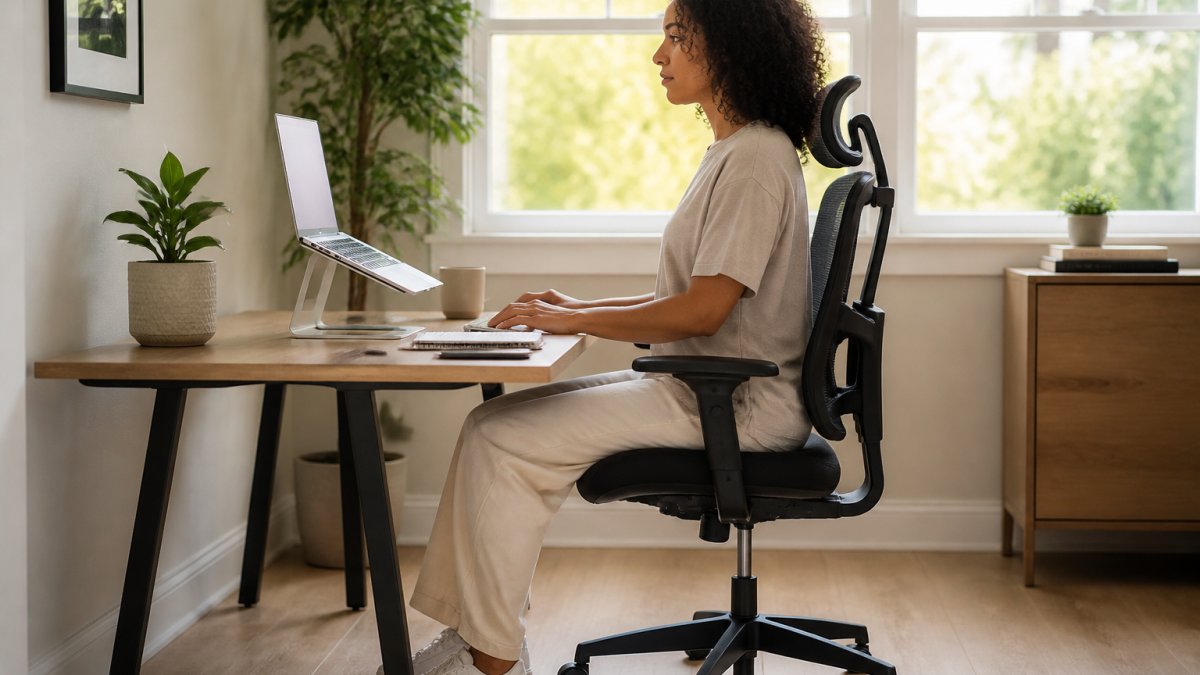
Home office desk ergonomics is the practice of arranging your screen, keyboard, mouse and chair so your body rests in a neutral position while you work. Get these four things right and you remove most of the strain that builds up over a working day.
Start with the screen, then work down to your chair. This order matters. If you fix your chair first and raise your screen later, you will undo the chair adjustment.
Screen Height and Distance
The top of your screen should sit roughly at eye level. Your gaze should land on the upper third of the display without tilting your head down.
- Raise a laptop with a stand or a stack of books
- Keep the screen an arm's length away
- Tilt it back slightly so it faces your eyes
- Add a separate keyboard if you raise a laptop
A raised laptop without an external keyboard is a trap. You fix your neck and wreck your wrists. If you type all day, split the two.
Keyboard, Mouse and Chair Positioning
Your elbows should rest near a right angle, with wrists straight and floating just above the keys. Your mouse should sit close enough that you are not reaching.
For the chair:
- Feet flat on the floor, or on a footrest
- Hips slightly higher than knees
- Lower back supported by the chair or a cushion
- Shoulders relaxed, not hunched
The Chartered Society of Physiotherapy guidance on desk setup recommends adjusting your chair before anything else, because every other fix depends on it.
The Best Chair for Posture at a Desk (And What to Look For)
The best chair for posture at a desk supports your lower back, lets your feet reach the floor, and adjusts to your height. You do not need the most expensive model. You need one that fits you.
Here is what actually matters:
| Feature | Why It Matters | What to Check |
|---|---|---|
| Lumbar support | Holds your lower back's natural curve | Adjustable height and depth |
| Seat depth | Keeps pressure off your thighs | Two fingers behind your knees |
| Adjustable height | Lets feet rest flat | Fits your desk height |
| Armrests | Takes weight off shoulders | Adjustable, or removable |
A common mistake is buying a chair for looks. A stylish seat with no lumbar curve will leave you sore by mid-afternoon. Test the fit, not the finish.
If your current chair is fine but your back still aches after long sits, a support cushion can bridge the gap. Our SpineFlow™ back support is designed for exactly this: comfort during long hours at a desk.
SpineFlow™ Fix Daily Back Pain From Sitting For Long Hours →
Desk Posture Exercises You Can Do in 5 Minutes
Desk posture exercises are short movements that undo the tightening caused by sitting. They take five minutes and need no equipment. Do them twice a day and your shoulders and neck will feel the difference.
The goal is simple: open the front of your body and wake up the muscles that hold you upright.
Stretches for Neck, Shoulders and Upper Back
Work through these in order. Hold each one gently. You should feel a stretch, never pain.
- Chin tucks - Pull your chin straight back, hold for five seconds, repeat ten times
- Shoulder rolls - Roll shoulders back ten times, then forward ten times
- Chest opener - Clasp hands behind your back, straighten arms, lift gently for twenty seconds
- Neck side stretch - Tilt your ear towards your shoulder, hold twenty seconds each side
- Upper back twist - Sit tall, place one hand on the opposite knee, twist and hold
A physiotherapist can show you variations if you have an existing injury. For most people, these five cover the main problem areas.
If your neck feels tight after screen-heavy days, a targeted support can help between stretches. Our NeckRelief Pro™ cervical pillow is made for restoring your neck after long hours at a screen.

How Often to Take Breaks From Sitting (And What to Do)
Take a short break from sitting every 30 to 45 minutes. Stand up, move for one to two minutes, then sit back down. The movement matters more than the length.
Long, unbroken sitting is the real enemy. Even a perfect posture held for three hours straight will cause stiffness. Your body wants variety.
Try this pattern:
- Every 30 to 45 minutes, stand and walk for a minute
- Every two hours, take a longer five-minute break
- Use a timer or an app so you do not forget
- Pair breaks with water refills or a quick stretch
The NHS advice on sitting and moving is clear that breaking up long periods of sitting helps your overall health, not just your back.
Common Mistakes That Undo Your Posture Progress
Most posture plans fail for the same handful of reasons. Spot them early and you keep your progress.
- Raising your screen but not your keyboard - this trades neck strain for wrist strain
- Sitting too far from the desk - this pulls you forward and rounds your back
- Ignoring breaks - no setup survives three hours of stillness
- Chasing perfect posture - holding yourself rigidly causes its own tension
- Buying gear before fixing the basics - a new chair will not help if your screen is too low
The biggest trap is expecting a quick fix. Posture improves through small, repeated choices. Set your desk up once, then let your breaks and stretches do the daily work.
Aim for "comfortably neutral", not "military straight". The position you can hold without effort is the one that lasts.
Frequently Asked Questions
How should I sit at a desk to improve my posture?
Sit with your feet flat on the floor and your hips slightly higher than your knees. Keep your back supported by the chair, shoulders relaxed, and elbows at roughly 90 degrees. Your screen should sit at eye level so your neck stays neutral. Aim to move every 30 to 45 minutes, since even good posture held for hours becomes uncomfortable. Small, consistent adjustments beat one big fix.
What exercises can help improve desk posture?
Try chin tucks, shoulder blade squeezes and doorway chest stretches. Each takes under a minute. Chin tucks counter forward head position, shoulder squeezes wake up the upper back, and chest stretches release tightness from hunching. Do a short round every hour or two. Consistency matters more than duration.
Can a chair improve posture while working from home?
A chair helps, but it will not fix posture on its own. Look for adjustable seat height, lumbar support that fits the curve of your lower back, and a seat depth that lets your knees bend at about 90 degrees. Pair the chair with a desk setup that keeps your screen at eye level. If back discomfort from long sitting is your main issue, a support like the SpineFlow™ cushion can ease pressure while you build better habits.
What should I do if sitting at my desk causes back or neck discomfort?
Start by checking your screen height and chair position, since these are the most common culprits. Take a short break every 30 to 45 minutes to stand, walk and stretch. If discomfort continues, try a targeted support such as the SpineFlow™ back cushion or the NeckRelief Pro™ pillow for neck tension after screen time. Persistent or worsening pain should be checked by a GP or physiotherapist.
Your posture will not fix itself, and a sore neck by Friday is a sign your setup needs attention. At Inspree, we curate practical, feel-good products that solve everyday problems, from back support for long sits to neck relief after screen-heavy days. Every order ships with secure UK delivery, tracked and insured, and our checkout is SSL encrypted for peace of mind. Get started with Inspree and build a workspace that feels as good as it looks.