

Regular Desk with Standing Converter: Will It Work?
Table of Contents
- Can You Use a Standing Desk Converter on Any Regular Desk?
- Standing Desk Converter Weight Capacity: What Your Desk Must Support
- Desk Stability and Surface Requirements for Safe Use
- Ergonomic Home Office Setup Tips When Adding a Converter
- Best Standing Desk Converter for Small Spaces
- Standing Desk Converter vs Full Standing Desk: Pros and Cons
- How to Check If Your Current Desk Is Converter-Ready
- Frequently Asked Questions
Last Updated: September 26, 2026
Can You Use a Standing Desk Converter on Any Regular Desk?
Not every regular desk can safely support a standing desk converter. Success depends on three critical factors: weight capacity, surface stability, and desk construction.
A standing desk converter sits on top of your existing desk, letting you alternate between sitting and standing without replacing furniture. Your desk must handle the combined weight of the converter, monitor, keyboard, and other equipment. If it wasn't built for that load, you risk instability, damage, or collapse.
Most modern desks made from solid wood or quality engineered materials can handle a converter. The challenge comes with older furniture, lightweight particle board, or desks designed for aesthetics rather than function.
Standing Desk Converter Weight Capacity: What Your Desk Must Support
Most standing desk converters weigh 10-20 kg. Add a typical monitor (5-8 kg), keyboard and mouse (1-2 kg), and you're looking at 20-35 kg or more on a small surface area.
Most regular desks aren't rated for this concentrated weight. When weight concentrates on a small platform rather than spreading across the full surface, stress increases dramatically.
Check your desk's weight capacity rating. If it can handle 25 kg or more concentrated on a single area, you're likely safe. If you can't find specs, test the desk yourself: place the converter where you'd use it, load it with equipment, and observe for flex, wobble, or creaking.
Motorised converters demand more structural support than manual ones. If considering a motorised converter, ensure your desk can handle at least 30 kg of concentrated load.
| Converter Type | Typical Weight | Recommended Desk Capacity | Best For |
|---|---|---|---|
| Manual (fixed height) | 8-12 kg | 20+ kg | Budget-conscious, lighter use |
| Manual (adjustable) | 10-15 kg | 25+ kg | Frequent position changes |
| Motorised (single motor) | 15-18 kg | 30+ kg | Regular standing routines |
| Motorised (dual motor) | 18-22 kg | 35+ kg | Heavy equipment, frequent use |
Desk Stability and Surface Requirements for Safe Use
Your desk's physical structure matters as much as weight capacity. A converter needs a stable, level surface. If your desk wobbles, tilts, or has an uneven top, a converter will amplify those problems.
Inspect your desk's legs and frame for solid construction and cross-bracing. Metal desks with welded frames and multiple support points are ideal. Single-pedestal desks or those with minimal frame support are problematic; the converter's weight creates a cantilevered load that can cause tipping or warping.
Solid wood, quality plywood, or engineered board with sturdy veneer can handle a converter. Thin particle board, hollow-core construction, or surfaces with visible flex are unsuitable. Press down on your desk; if the surface dips or bounces, the converter will sit unevenly.
If your desk isn't level, the converter sits at an angle and your monitor won't align with your eyes. Use a spirit level to check your desk surface. If it's off by more than 5 mm over 60 cm, you'll notice the problem immediately.
Desk depth matters: a converter needs enough space for your monitor and keyboard. If your desk is under 60 cm deep, you may have inadequate working distance.
Ergonomic Home Office Setup Tips When Adding a Converter
Once your desk can handle a converter, the next challenge is setting it up correctly. Poor ergonomics defeat the entire purpose.
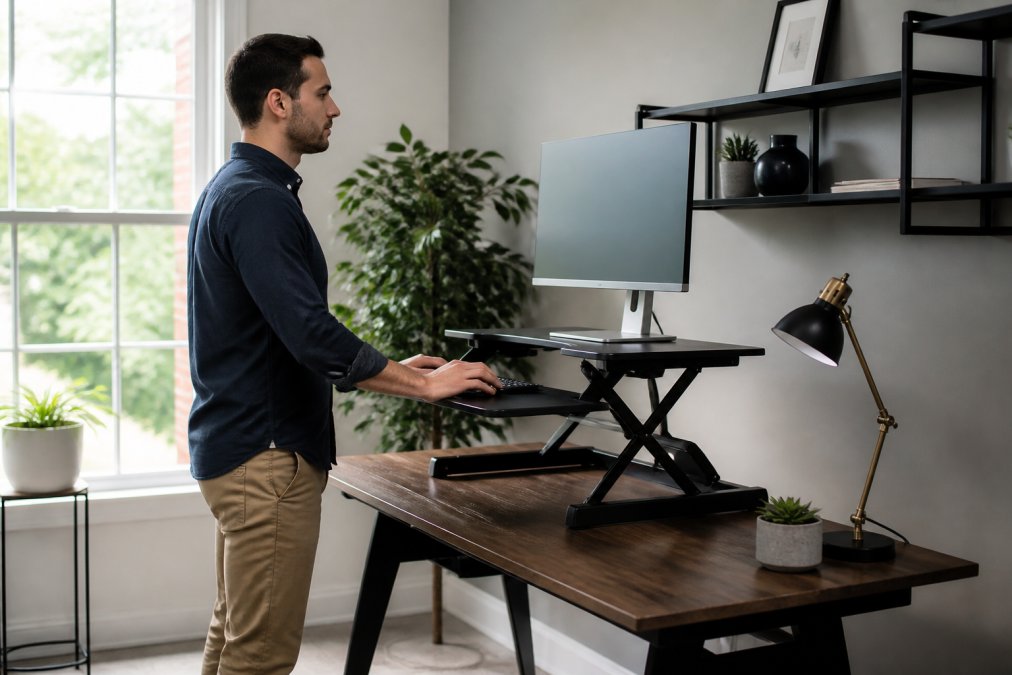
When standing, your eyes should align with the top third of your monitor screen. This keeps your neck neutral and prevents forward slouch. If your monitor is too low, you'll compress your cervical spine.
Your elbows should bend at roughly 90 degrees when typing, with wrists straight. If your converter places the keyboard too high or too low, you'll develop wrist and forearm tension. Avoid stacking the keyboard on top of the converter.
Consider your standing posture. Many people stand with all their weight on one leg, creating hip imbalance. Distribute your weight evenly. Engage your core slightly. Your shoulders should be relaxed, not hunched. If you're new to standing work, start with short intervals, 15 to 20 minutes of standing, then sit for 30 to 45 minutes. Gradually extend your standing time as your body adapts.
SpineFlow™ Fix Daily Back Pain From →
If you experience back discomfort after adding a converter, consider pairing it with ergonomic support. The SpineFlow™ Fix Daily Back Pain From Sitting For Long Hours (£34.99) is designed to address strain from prolonged sitting, and it complements standing work by supporting your lower back during seated intervals. For neck strain from screen time, the NeckRelief Pro™ Restore Your Neck After Hours Of Screen Time (£39.99) provides targeted relief and helps restore proper alignment after hours at the desk.

Take regular breaks. Standing all day is no better than sitting all day. The goal is movement and position variation. Alternate between sitting and standing every 30 to 45 minutes. Use breaks to stretch, walk, or change your posture entirely.
Best Standing Desk Converter for Small Spaces
Space constraints are real, especially in home offices. Not every converter fits every desk. If you're working with limited square footage, you need a compact option that doesn't overwhelm your workspace.
Look for converters with a footprint under 80 centimetres wide and 40 centimetres deep. These fit most standard desks without dominating the surface. Single-monitor setups benefit most from compact converters. If you use dual monitors, you'll need a larger platform, which may not suit a small desk.
Height range matters too. A converter with a 10-15 centimetre height adjustment range works for most people. Taller individuals may need 15-20 centimetres to achieve proper standing posture. Shorter individuals might find even 10 centimetres sufficient. Check the specifications before purchasing.
Manual converters are lighter and more compact than motorised models. If space is tight, a manual converter is your best choice.
Standing Desk Converter vs Full Standing Desk: Pros and Cons
The converter-versus-full-desk question comes down to budget, space, and long-term commitment. Each approach has genuine trade-offs.
Standing Desk Converter Pros:
- Lower cost (typically £150-400 versus £400-1,200 for a full standing desk)
- Keeps your existing desk, reducing waste and adjustment time
- Compact and easier to move if you change offices
- Works with desks you already own
- Less disruptive to install
Standing Desk Converter Cons:
- Requires a suitable underlying desk (not all desks qualify)
- Smaller work surface than a full standing desk
- Height adjustment is often manual, requiring physical effort
- Less stable than a purpose-built standing desk
- Concentrates weight on a small area, risking desk damage
Full Standing Desk Pros:
- Engineered specifically for standing work, with optimal stability
- Larger work surface accommodates more equipment
- Motorised options offer effortless height adjustment
- Height range typically broader (60-120 centimetres)
- Designed to distribute weight evenly across the frame
- Often includes memory presets for different users or tasks
Full Standing Desk Cons:
- Significantly higher cost (£400-1,200+)
- Requires replacing your current desk entirely
- Takes up similar footprint to a regular desk
- Requires assembly and potentially professional installation
- Less portable if you move offices frequently
How to Check If Your Current Desk Is Converter-Ready
Before buying a converter, run through this checklist to determine whether your desk can handle one.
Frequently Asked Questions
Is it safe to put a standing desk converter on any desk?
Not every desk can safely support a standing desk converter. Your desk must have a sturdy, level surface and sufficient weight capacity. Most converters weigh 5-15 kg and need to support your monitor, keyboard, and other equipment on top. Flimsy desks, those with uneven surfaces, or ones showing signs of wear may not be safe. Check your desk's construction and stability before placing a converter on it. If your desk wobbles or feels unstable when empty, adding a converter will make the problem worse.
What are the main weight limits for standing desk converters?
Standing desk converter weight capacity typically ranges from 10 kg to 25 kg, depending on the model. This limit includes the weight of your monitor, keyboard, mouse, and any other items you place on the converter surface. A standard monitor weighs around 4-6 kg, so you have room for additional equipment. Always check the manufacturer's specifications before purchase. Exceeding the weight limit can cause the converter to fail, damage your desk, or create a safety hazard. If you use multiple large monitors, verify the converter can handle the total load.
What makes a desk suitable for a standing desk converter?
Your desk needs a flat, level surface at least 60 cm wide to accommodate a standard converter. The desk must be sturdy, with no wobbling or flex when you apply moderate pressure. Solid wood or high-quality laminate desks work best. Avoid glass tops or desks with thin veneers that may crack under pressure. The desk legs should be stable and positioned to support the added weight. Desks that are already showing wear, damage, or instability are not suitable. Test your desk's firmness before purchasing a converter.
Are standing desk converters stable enough for daily use?
Yes, quality standing desk converters are stable when placed on a suitable desk and used within their weight limits. Stability depends on three factors: the converter's design, your desk's structural integrity, and proper setup. Converters with a wide base and lower centre of gravity offer better stability. Ensure the converter sits flat on your desk with no overhang on the edges. Avoid placing heavy items on one side only, as this can cause tipping. If you notice any wobbling or movement when typing, your desk or converter may not be suitable for daily use.